
A-Z Index | Find People

Student Business Services

203 Hahn Building
UC Santa Cruz
1156 High Street
University of California
Santa Cruz, CA 95064-1077
Email: oarinfo@ucsc.edu
Phone: (831) 459-2107
Fax: (831) 459-3918
DO NOT FAX FINANCIAL AID
DOCUMENTS TO THIS FAX!

Office Hours
Mon-Thur: 9am-12pm

1 pm- 4 pm
Friday: 10am - 12 pm

1pm-4pm
Closed between: 12pm & 1pm

[ Photo ]

MISSION STATEMENT

Student Business Services will deliver exceptional customer service and support to our students, employees and external agencies.

________________________________________

Financial Information is available under Accounts and Billing on your Student Portal. Please check this link regularly to keep track of any due charges. If you wish to contest a late fee, we will respond to your request within 3-5 days and email you the resolution. You are responsible for paying the charges on your account. An electronic copy of your bill is available on the Student Portal and SallieMae each month you have charges due.

________________________________________

FERPA

As an outgrowth of the University's commitment to the student's privacy and protection against identity theft, the Office of Student Business Services will no longer accept requests from the students to release financial information to a parent or third party. Students are encouraged to use the Student Portal to obtain information about current charges and activity. All financial activity posted to the statement is considered confidential. Financial records are subject to privacy protections governed by the Federal Family Educational Rights and Privacy Act.

________________________________________

Important Fee Information

University fees are approved by the Regents and are subject to change. The amounts shown on your Statement of Accounts and Student Portal represent fees as currently approved for the specified term. The fee amounts billed for this period may be adjusted at a future date.

Fee amounts are subject to change without notice. Refer to the UCSC Office of the Registrar for the latest information on registration fee amounts. As you may have other debts to the university, your statement shows you the exact amount you have to pay, designated as “Amount Due,” to complete registration.


Important


Information


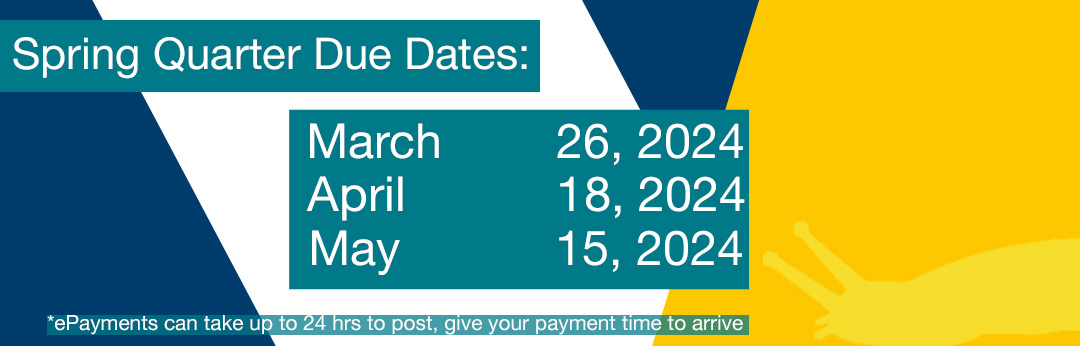
SPRING BILLS are available beginning March 30th and Due April 19th.

Use our Payment Calculator for assistance calculating the amount due.

Anticipated Financial Aid and Payment Information:

Deduct the anticipated financial aid from the charges. If the aid is greater than the charges you owe nothing. If the aid is less than the charges, that is the amount you will need to pay. Use our Payment Calculator for assistance calculating the amount due


2011-2012 Fiscal Year Billing Cycle

Please see the Bill Schedule for the 2011-2012 fiscal year billing.

________________________________

Electronic Billing and Payment

SallieMae E-Bill and E-check= No Paper Bills and No Sending Checks

UCSC uses SallieMae for its E-billing and E-check payment. Sign up on your portal and invite your parent. If you elect to not pay online using SallieMae, you must print the payment coupon to mail in with your check. This is located on the bottom of your e-bill.

For more information on SallieMae, please visit these links below: GREEN

SallieMae - Student Payer Information

SallieMae - Other Payer Information (Parent)


____________________________________

Need help with Registration fees? Apply for the Deferred Payment Plan.

_______________________________

Refunding made Quicker and Easier

Direct Deposit (refunds only)

Sign up for Direct Deposit online through your Student Portal. Direct deposit is for refunding credit balances only. Activation of your account information is immediate!
A paper form is still available in our office at 203 Hahn. Checking or savings accounts are eligible. You need the 9 digit routing number and account number. Not the number on your debit card! Use this link to find your routing number:

http://www.routingnumbers.org/

or call your bank for specific information

____________________________


New!

E-Delivery!

1098-T Tax Information:

To sign up for electronic delivery of your 1098-T log into the TCRS website located at http://www.1098-T.com. Click on the ‘Access My Record’ tab located on the homepage and log into your account. Once logged in select ‘Receive 1098-T Forms electronically’ and follow the directions.

2011 information is available on:
www.1098-T.com. Phone 1-877-467-3821.


____________________________________